Every unit,
accounted for in transit.
Transfers move through Requested, Approved, Dispatched, In Transit and Received. Purchase orders start from what actually sold, receipts carry landed cost, and when a delivery comes up short, someone has to say where the units went.
From purchase order
to shelf.
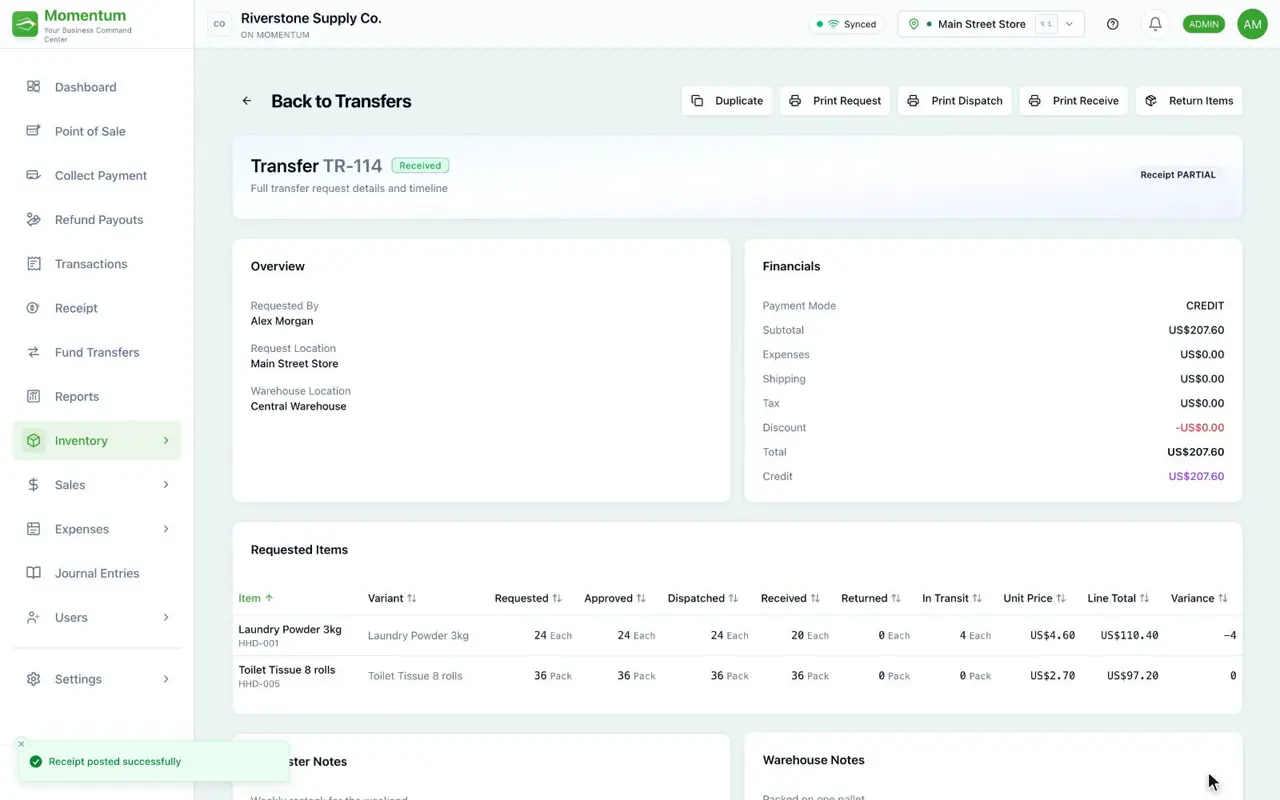
Requested, approved, dispatched, in transit, received, and both ends see the same one.
Missing units go back to the sender or are written off. They never just vanish.
Quantities prefilled from what sold, ready for you to edit.
Move stock
with a paper trail.
A store requests stock, someone approves it, the sender dispatches it and the receiver confirms what arrived. Each step is recorded, so you always know where a transfer is and who moved it on.
- Requested → Approved → Dispatched → In Transit → Received
- Batches travel with the transfer
- Both locations see the same status
Where did the
missing units go?
When a receipt comes up short, Momentum asks. The missing units are either sent back to the sender or written off as lost in transit, and the loss is posted to the books.
- A short receipt can't be closed silently
- Return to sender, or write off as lost in transit
- The loss is posted, not just noted
Order what sells,
not what you guess.
Start a purchase order and Momentum prefills the quantities from your recent sales and what's on hand. It's plain arithmetic you can check and change, not a black box.
- Quantities prefilled from recent sales
- Change any line before it goes out
- A Supplier Scorecard report to compare suppliers
Know what it
really cost.
Add freight, duty and other charges to a receipt and Momentum spreads them into the unit cost, so your margins use the real number. The supplier's bill is recorded against the same purchase.
- Freight and duty folded into unit cost
- Margins calculated on landed cost
- Supplier bills recorded against the purchase
From supplier to shelf,
in one system.
See what's on the road between locations right now.
Supplier bills recorded against the purchase they belong to.
Lots and expiry dates travel with every receipt and transfer.
The rest of the platform
See a transfer
from request to receipt.
Book a walkthrough and follow a transfer through every state, including a short delivery.
- 1A transfer from Requested to Received
- 2A short delivery being explained
- 3A purchase order prefilled from sales